
TurboScribe.ai Review: Accurate Transcripts, but What Happens Next?
If you’ve been searching for an AI tool to transcribe audio or video, TurboScribe has likely already shown up in your results. It positions itself as a fast, browser-based transcription tool with an emphasis on high accuracy, support for long recordings, and large-scale processing. It also includes practical features such as speaker identification and multilingual translation, according to its official website (accessed April 2026).
In this review, we’ll take a closer look at how TurboScribe performs in real-world use cases, what it is best suited for—such as studying, meeting notes, and content creation—and how it compares with alternatives like Otter.ai, HappyScribe, and NoteGPT. We’ll also cover key factors to consider before using it, including pricing, limitations, and data privacy.
What is TurboScribe?
TurboScribe is a transcription tool that converts audio and video into accurate written text quickly. Built on OpenAI’s Whisper model and launched in August 2023, it is designed to turn long recordings into structured transcripts with minimal effort.
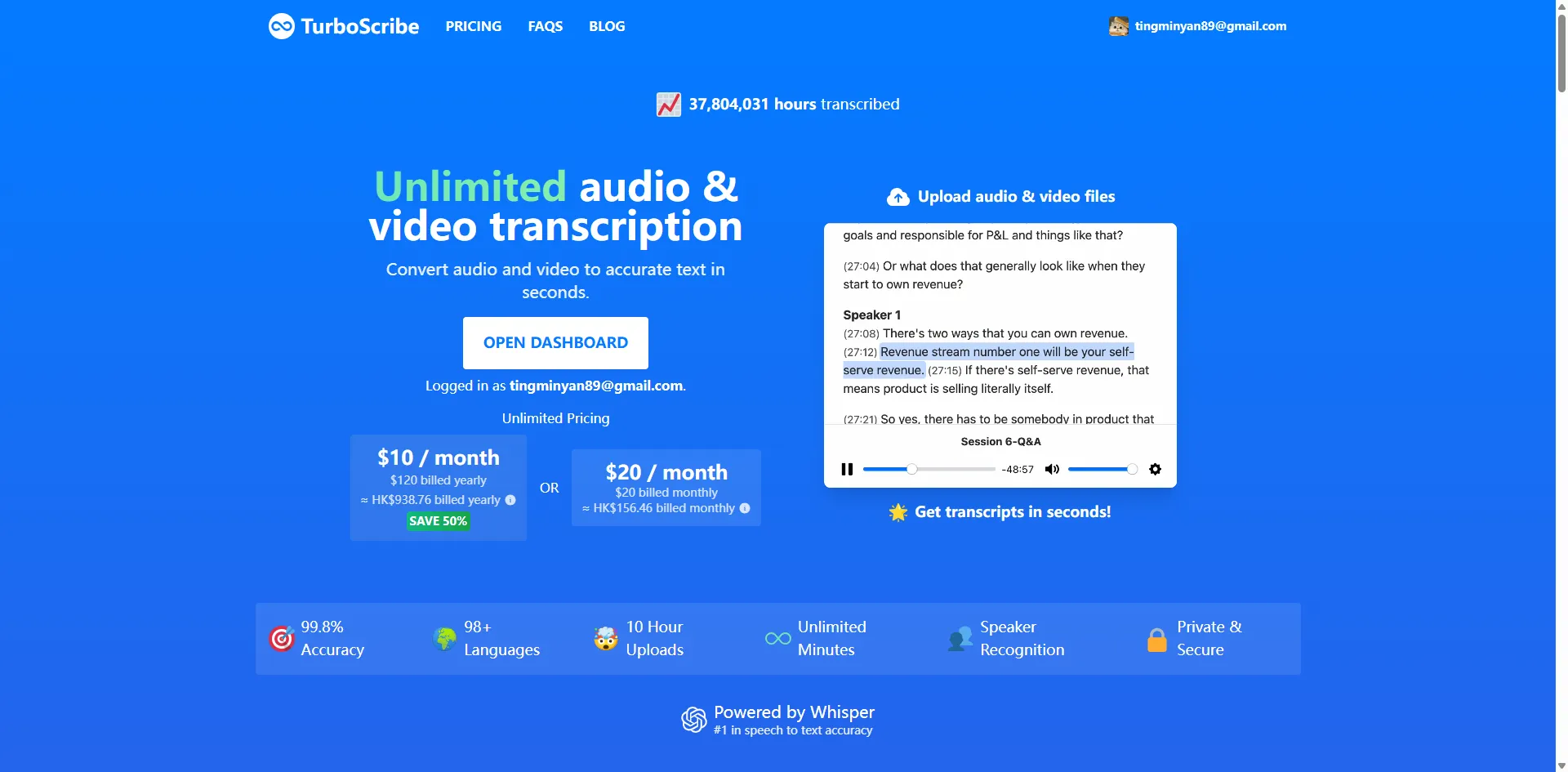
One of its key features is “unlimited audio and video transcription,” which allows users to process large volumes of content without strict limits on usage or duration. This makes it particularly suitable for users who regularly handle meetings, interviews, lectures, or other long-form recordings.
TurboScribe Features and Transcription Modes
Based on official information, TurboScribe’s core capabilities include:
- Unlimited audio and video transcription, capable of handling hundreds of hours of content
- GPU-accelerated processing for fast transcription of long recordings
- Large file support (up to 10 hours or 5GB per file), with batch upload capability
- Wide format compatibility, including MP3, MP4, M4A, MOV, AAC, WAV, OGG, OPUS, MPEG, WMA, and YouTube content
- Multiple export options such as TXT, DOCX, PDF, and subtitle formats like SRT and VTT
Another key feature of TurboScribe is its transcription mode system (based on its official blog). Unlike traditional single-mode processing tools, it offers three distinct modes:
- Cheetah Mode focuses on speed and can transcribe around 1 hour of audio or video in roughly 30 seconds, making it suitable for quick drafts or rough notes
- Dolphin Mode balances speed and accuracy, processing about 1 hour of content in around 3 minutes, which makes it well suited for everyday use such as meetings or lectures
- Whale Mode prioritizes accuracy and typically completes 1 hour of transcription in under 10 minutes, making it more suitable for interviews or structured content
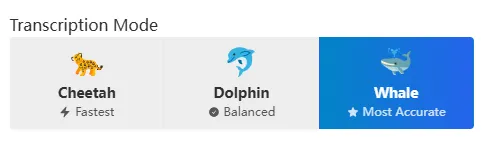
From a practical perspective, this three-tier system gives TurboScribe more flexibility compared to traditional transcription tools. Users are not locked into a single speed or accuracy level and can choose the most appropriate mode depending on the type of content they are working with. These modes are built on different sizes of the Whisper model, ranging from lightweight versions to larger models, creating different trade-offs between speed and accuracy and forming the technical foundation of the system.
TurboScribe Pricing Explained: Free Plan vs Paid Plan
TurboScribe operates on a freemium model, allowing users to start with a free plan to access basic transcription features. Paid plans unlock unlimited transcription, faster processing speeds, and support for longer audio/video files as well as larger uploads. The main upgrade option is the Unlimited plan, designed for frequent or professional use, removing daily limits and per-file duration restrictions.
According to official pricing information, the Free plan includes up to 3 transcriptions per day, with each file limited to 30 minutes. Tasks are also processed at a lower priority, which may result in longer waiting times during peak usage. In comparison, TurboScribe Unlimited is priced at around $10 per month or $120 per year (billed annually, typically saving about 50%). It includes unlimited transcription, support for files up to 10 hours or 5GB, and batch uploads of up to 50 files. Additional features include support for 134+ languages, bulk export options, unlimited storage, and priority processing for faster turnaround times.
Before subscribing, it’s worth considering a few practical points:
- Evaluate your usage level: the free plan is best suited for light use or short audio transcription
- Review cancellation and support policies in advance to understand how subscriptions are managed
- Always check the latest pricing and regional availability on the official website, as details may change over time
Is TurboScribe Worth It? Real Reviews and Performance Analysis
Based on user feedback and recent review coverage, TurboScribe’s core value mainly comes down to two closely related factors: transcription accuracy and real-world usability (how reliably it converts audio into structured text, and how simple and efficient the overall workflow is).
Recent feedback and review insights:
- Across user feedback and third-party reviews, TurboScribe is generally reported to perform well in clear, high-quality audio scenarios such as meetings, lectures, and interviews. The generated transcripts are often described as well-structured and readable, making them suitable for note-taking or light editing in most cases. This pattern is reflected in Reddit discussions (r/ChatGPTPro) and Trustpilot user reviews, while Product Hunt feedback places more emphasis on its usefulness for interview transcription, multilingual support (including Turkish), and adjustable transcription speed features.
- However, limitations become more apparent in complex real-world conditions. Background noise, overlapping speakers, strong accents, or low-quality recordings can lead to reduced accuracy or missing content. This issue is frequently mentioned in Reddit user feedback and various AI transcription tool reviews, with a general consensus that performance is highly dependent on input audio quality.
Which Is Better: TurboScribe vs Otter.ai, HappyScribe and NoteGPT?
Which tool is better ultimately depends on your specific use case—whether you prioritize real-time meeting transcription, large-scale audio processing, professional subtitle creation, or AI-powered summarization and knowledge organization. Since each tool is designed with a different focus, there is no single “best” option.
- Otter.ai is primarily built for meeting transcription and team collaboration. It integrates seamlessly with platforms such as Zoom, Microsoft Teams, and Google Meet, enabling real-time transcription with automatic summaries and speaker identification, which helps improve remote collaboration efficiency. Based on user feedback from Google Play, it is widely appreciated for reducing manual note-taking and improving meeting traceability, although accuracy may decline in more complex audio environments with multiple speakers.
- HappyScribe focuses on professional transcription and subtitling workflows. It supports multilingual transcription, subtitle export, and collaboration features, making it widely used in media production and localization. According to discussions on Reddit (r/WorkOnline) and Trustpilot reviews (2025), users highlight its strong performance in speed and subtitle handling, though concerns remain around translation quality, editing flexibility, and the subscription experience.
- NoteGPT is more oriented toward AI-powered summarization and knowledge organization rather than pure transcription. It is mainly used to convert text or transcripts into structured summaries and notes. Based on Trustpilot (2025) feedback, users value its summarization efficiency and ease of use, but some mention unclear free-tier limitations and a lack of transparency in its pricing structure.
- TurboScribe is an AI transcription tool focused on fast, high-volume processing and accurate output. It performs reliably in clear audio scenarios such as meetings, lectures, and interviews, producing clean and easy-to-edit transcripts. However, accuracy may decrease in noisy environments or multi-speaker recordings, making it better suited for high-volume, lightweight transcription workflows.
Overall, these tools are not direct competitors in terms of superiority but rather differ in purpose and workflow focus. Otter.ai is best suited for real-time collaboration, HappyScribe for professional media and subtitle production, NoteGPT for summarization and knowledge structuring, and TurboScribe for efficient batch transcription of large volumes of audio and video content.
For users with more lightweight or general-purpose needs, Audio Transcriber AI can also serve as a flexible option that covers basic transcription, subtitles, and simple summarization in a streamlined workflow.
How TurboScribe Handles Privacy and Data Security
According to the official Security & Privacy FAQ, TurboScribe adopts a standard cloud-based security architecture for data protection. All audio and transcription data are encrypted in transit using HTTPS/SSL, and stored data is protected with industry-standard encryption such as AES-256, helping reduce the risk of data breaches. In addition, user files and transcriptions are only accessible to the account owner, and the platform does not access or share user data without authorization.
TurboScribe also explicitly states that it does not use uploaded audio or video content to train AI models. Users can export or delete their data at any time, and deleted data is generally not recoverable. Payments are processed through third-party providers such as Stripe, ensuring that sensitive payment information is not directly handled by the platform. Overall, its privacy design aligns with common cloud security standards and is suitable for general use cases such as meetings and content transcription, although users handling highly sensitive or strictly regulated data should still evaluate its usage scope carefully.
Verdict
TurboScribe is a lightweight, high-throughput transcription tool designed for efficiently processing large volumes of audio and video content. It performs consistently well in clear audio scenarios, quickly turning recordings into structured text, making it a practical choice for everyday use cases such as meetings, lectures, and interviews.
For most users, it strikes a solid balance between speed and usability, positioning itself as a straightforward “plug-and-play” transcription solution.
Compared to other tools in the space, TurboScribe is less focused on real-time collaboration or advanced content workflows. Tools like Otter.ai are better suited for live meeting transcription and team environments, HappyScribe fits more into professional media and subtitle production workflows, while NoteGPT is stronger in AI-driven summarization and knowledge organization.
In contrast, TurboScribe is best viewed as a core transcription utility—particularly useful for users who need to process large amounts of audio or video quickly and with minimal setup.
Overall, it is worth trying, especially on its free or low-cost plan, before deciding whether to upgrade based on whether you need more advanced collaboration or editing features.
How we evaluated (methods and limitations)
This review is based on multiple sources, including the official TurboScribe website and product documentation, the Security & Privacy FAQ, as well as third-party platforms such as Reddit, Trustpilot, and Product Hunt. The analysis reflects publicly available information and user feedback collected between 2025 and 2026, with insights synthesized across sources rather than derived from a single benchmark test.
It is important to note that pricing may vary by region, time, and product updates. As a result, any pricing information mentioned in this article should be treated as indicative only. Users are advised to confirm the latest pricing directly on the official website or within the product interface before subscribing. Similarly, privacy policies and data handling practices may change over time, so it is recommended to refer to the most up-to-date official documentation.
If you want to quickly evaluate whether TurboScribe fits your needs before making a purchase decision, you can run a simple hands-on test:
- Use the free plan’s daily allowance (up to 3 files per day, each under 30 minutes) for initial testing
- Upload different types of audio (e.g., meetings, lectures, interviews) to evaluate transcription accuracy and text structure
- Compare performance between clean audio and challenging conditions (e.g., background noise or multiple speakers)
- Measure end-to-end processing time from upload to final transcript generation
- Check whether export formats (such as TXT or SRT) fit your actual workflow needs
Frequently asked questions
1. What is TurboScribe used for?
TurboScribe is an AI transcription tool designed to convert audio and video files into written text efficiently. It is commonly used for meetings, lectures, interviews, and content creation, where turning speech into structured text is required.
2. How accurate is TurboScribe?
TurboScribe generally performs well with clear and well-recorded audio, producing transcripts that are structured and easy to read. In more challenging conditions—such as background noise, overlapping speech, or strong accents—accuracy may vary depending on the input quality.
3. Can TurboScribe handle long recordings?
Yes. TurboScribe is designed to support long-form audio and video files, including recordings that last several hours. It also supports large file uploads and batch processing, which makes it suitable for users dealing with extended or multiple recordings.
4. How do AI transcription tools perform in different conditions?
Performance varies depending on audio quality and context. Clean recordings with clear speech usually produce high accuracy, while factors such as noise, accents, or multiple speakers can reduce transcription reliability across most AI tools.
5. What should I consider when choosing a transcription tool?
Key factors typically include transcription accuracy, processing speed, supported formats and languages, pricing structure, and data privacy. Depending on workflow needs, some users may prefer tools focused purely on transcription, while others may look for solutions that also support subtitles, summarization, or a more integrated workflow experience, such as Audio Transcriber AI.