
Akool AI Voice Generator Honest Review 2026: Is It the Best AI Voice Tool for Creators?
Creating voice content has always been one of the more time-consuming parts of content production. A video script can be written in an afternoon, but turning that script into a natural-sounding voiceover usually requires recording equipment, a quiet environment, and multiple rounds of editing.
If you are looking for an AI voice generator, you have probably come across Akool. But before you sign up, there is one thing you should know: Akool is not a voice-first platform.
Akool is built as a broader AI content creation platform that combines voice generation with AI videos, avatars, and other creative features. This can be a big advantage if you want to create content in one place, but it may not be the best choice if you only need to generate thousands of voiceovers.
So, is Akool's AI voice generator actually worth paying for? How natural do the voices sound? Are the voice cloning features good enough? And how does its pricing compare with dedicated AI voice tools?
In this Akool AI Voice Generator review, we will take a closer look at its main features, step-by-step tutorial, pricing, advantages, limitations, some of the best alternatives available today, and FAQs.
Quick Verdict: Is Akool AI Voice Generator Worth It?
| User Type | Recommendation |
|---|---|
| AI video creators | ✅ Akool |
| Marketing teams | ✅ Akool |
| Users needing AI avatars + voice | ✅ Akool |
| Multilingual and accent content | ✅ Akool |
| Users wanting a free AI voice tool | Consider alternatives |
| Long-form narration creators | Consider alternatives |
| Users needing thousands of voices | Consider alternatives |
| Budget users | Compare pricing carefully |
What Is Akool AI Voice Generator and How Does It Work?
Akool is a creative AI platform that brings together tools for making videos, avatars, and voices. It is mainly built for creators, marketers, and businesses that want to produce digital content faster without having to rely on a traditional production workflow.
Within its creative ecosystem, Akool AI Voice Generator (also known as Voice Lab) focuses on AI-powered voice creation. Instead of recording every line manually or working with professional voice actors, users can generate realistic AI voices, customize voice styles, and create audio content directly from text or existing recordings.
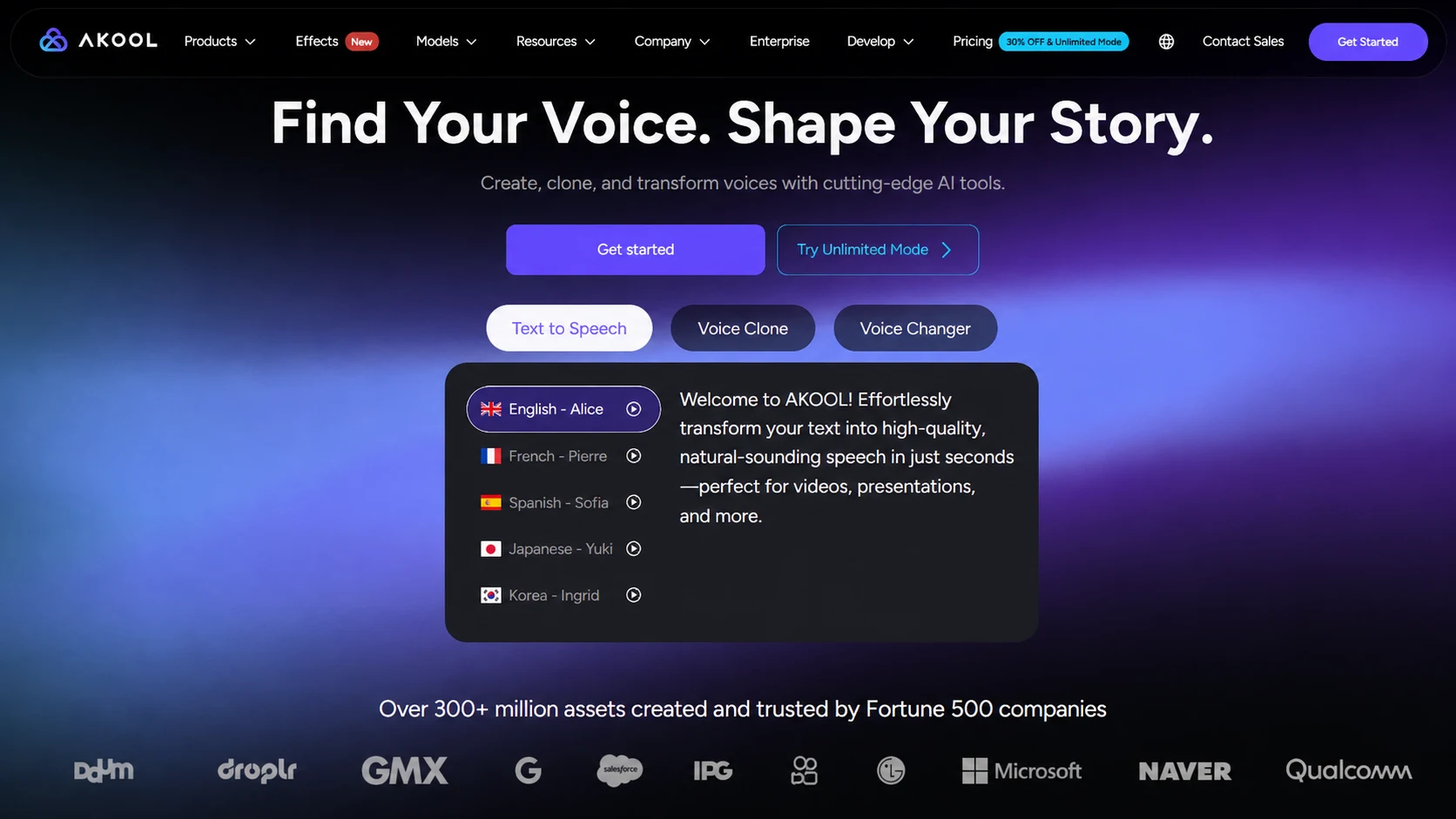
What makes Akool interesting is that voice generation is not limited to simple text-to-speech. The Voice Lab includes three different ways to work with AI voices:
Akool Text to Speech
The core AI voice generator feature, which converts written scripts into natural-sounding speech. Users can select from different AI voices, languages, and voice styles to create narration for videos, podcasts, online courses, advertisements, and other content.
This feature works well for creators and businesses that need audio content at scale, such as:
- Audiobook & Long-Form Narration: Convert written books, articles, or reports into polished spoken audio for listening audiences.
- Video Voiceovers: Add consistent narration to YouTube explainers, product reviews, podcasts, and tutorial videos without booking studio time.
- E-Learning & Training: Build clear, professional voiceovers for online courses, onboarding flows, and internal training.
Akool Voice Clone
This feature allows users to create an AI version of an existing voice. It can be used for maintaining a consistent brand voice, creating personalized digital voices, or producing voice content without repeatedly recording the same speaker.
Common use cases include:
- Brand Voice Consistency: Maintain a consistent voice identity across marketing campaigns, customer communications, and digital experiences.
- Game & Film Dubbing: Build unique voices for games, animations, and storytelling content where a specific voice style is needed.
- Documentary & Historical Recreation: Reconstruct a narrator's or historical figure's voice for storytelling projects.
- Multilingual Voice Production: Keep the same speaker identity while creating content in different languages for global audiences.
Akool Voice Changer
Voice Changer transforms existing recordings into different AI voice styles. It is designed for creative applications such as gaming, entertainment content, live streaming, and audio experiments. It can also help users modify their voice for privacy-focused applications, while giving you the ability to add audio effects that make your videos, podcasts, and other creative projects really stand out.
Some common applications include:
- Live Stream Identity: Shift your voice in real time for gaming, entertainment, or interactive streams.
- Privacy on Calls: Mask your real voice during online interactions and recordings.
- Creative Audio Effects: Drop character voices into videos, podcasts, or short-form social clips.
- Role-Play & Entertainment: Explore different vocal styles for creative projects, podcasts, and digital media.
How to Generate Voices with Akool
While Akool offers three voice output methods, the Text-to-Speech function is the most widely used. Here's a step-by-step breakdown based on my hands-on testing.
Step 1: Prepare Your Script
Paste a prepared script directly into Akool and use it as the foundation for your voiceover. If your content feels too plain or does not sound natural when spoken, you can choose different refinement styles
Step 2: Choose an AI Voice and AI Model
Browse through Akool's extensive voice library featuring 900+ AI voices, filtered by:
- Language and accent
- Gender and age
- Style (Narrative, Conversational, Characters & Animation, Social Media, Advertisement, etc.)
You can also search for specific voice types like "Mature Uncle" or "Elegant Lady." Then, select different voice models, such as Azure, ElevenLabs, or Hailuo, depending on the language and voice style you need.
Step 3: Fine-Tune Advanced Parameters
Akool lets you customize the generated voice with settings like:
- Speed: Slower or faster delivery
- Stability: More variable vs. more stable (affects consistency)
- Similarity: Low to high (voice clarity and similarity)
- Style Exaggeration: Adjust expressiveness from subtle to dramatic
- Speaker Boost: Enhances audio presence
Step 4: Generate and Export the Audio
Hit the "Generate" button, listen to the output, and download as MP3 or WAV.
Voice clone and voice changer follow a similar shape - upload or record audio, choose a target voice, adjust settings, and generate.
Core Benefits of Akool AI Voice Generator
After testing Akool AI voice generator, I found that it stands out in a few important areas. While many AI voice tools can turn text into speech, the real difference comes from how natural the voice sounds, how much control you have over the output, and how easily you can create different types of content. Akool does a good job of combining voice quality with practical features that creators actually need.
High-Quality Voices with Strong Consistency and Accuracy
One of the first things I noticed when trying Akool was the overall stability of its generated voices. The pronunciation is clear, the pacing feels natural, and the voice style stays consistent throughout longer scripts. This matters a lot for content like YouTube videos, courses, and narration, where an unnatural change in tone can quickly make the audio feel less professional.
Flexible Voice Controls for Different Content Styles
Akool gives you more control over how the final voice sounds instead of locking you into a fixed speaking style. After selecting a voice, you can adjust settings such as speed, stability, similarity, style exaggeration, and speaker boost. A documentary narration may need a calm and steady delivery, while a promotional video may benefit from a more energetic and expressive voice. Being able to fine-tune these details helps the generated audio match the feeling of the content rather than just reading the words.
Save Time with AI Refine Script
The Refine Script feature, powered by ChatGPT integration, rewrites your text into four refinement styles: Storytelling, Exploration, Promotional, and Motivational. Each one changes the tone of the script for a different purpose. A storytelling mode can add more emotion to a narration, while a promotional style can make a product script sound more persuasive.
Three AI Models of Akool AI Voice Generator
| Model | Best For |
|---|---|
| Azure | Balanced multilingual performance |
| ElevenLabs | English, French, Japanese, and others |
| Hailuo | Chinese, Cantonese, Korean, Hindi, and others |
Akool AI Voice Generator Pricing
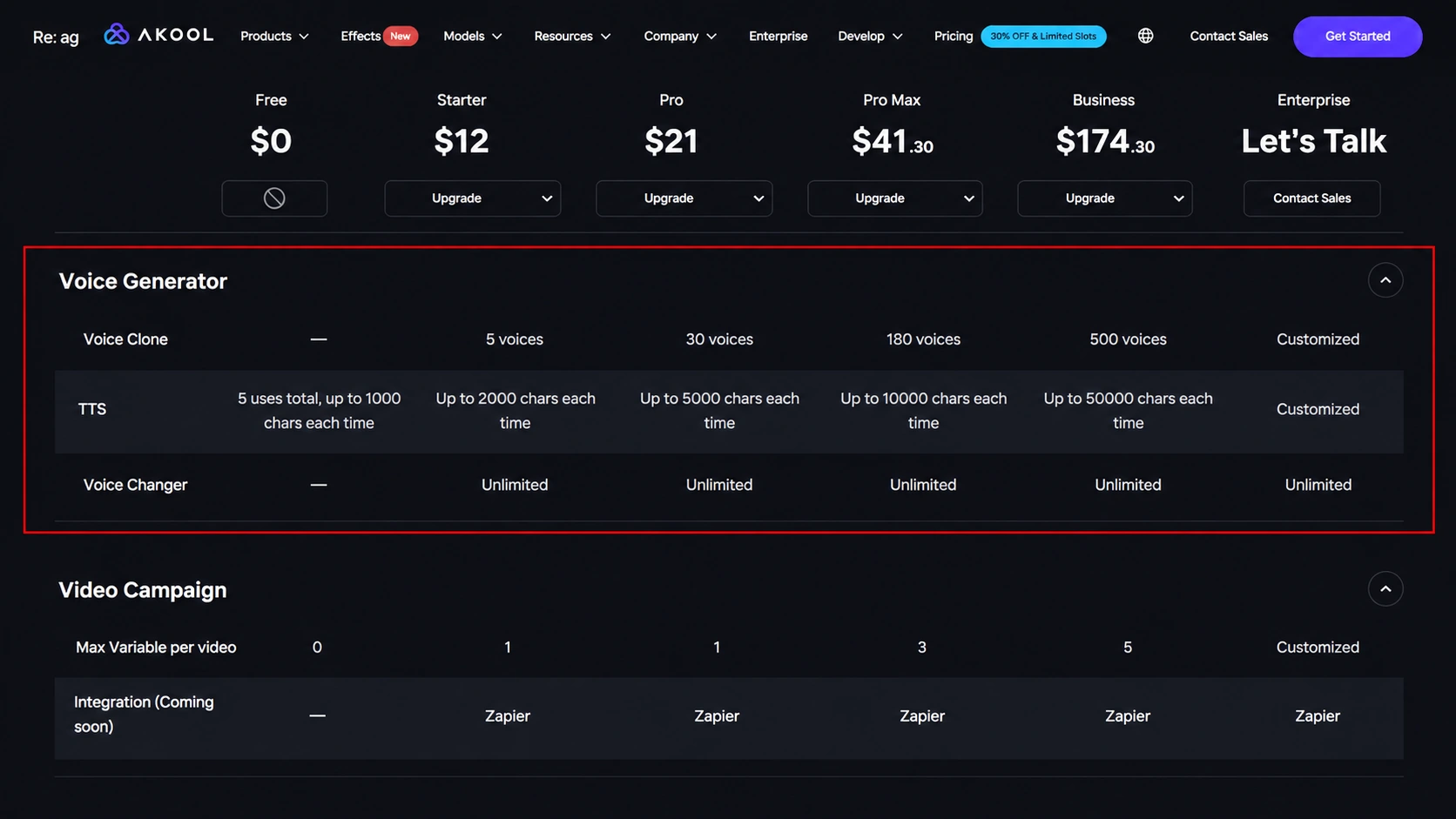
Akool's free plan works mainly as a way to test the platform before upgrading. You can explore its AI creation features and try its text to speech.
Voice Clone and Voice Changer are not available on the free plan, so users who want to create custom voices or transform existing recordings will need to move to a paid subscription.
Is Akool AI Voice Generator Worth Paying for?
When looking specifically at AI voice generation, Akool takes a slightly different approach from dedicated voice platforms. Its pricing is designed around an AI video and image workflow rather than only charging for minutes of generated audio or voice.
This makes Akool a strong choice for users who want an all-in-one AI content toolkit. But for creators whose daily work mainly involves generating long-form narration, audiobooks, or large volumes of voiceovers, it is worth comparing Akool with specialized AI voice generators that focus entirely on audio production.
Who Should Use AKOOL AI Voice Generator - and Who Shouldn't
Akool is the right call if:
- You are already creating videos inside Akool and want narration wired into that pipeline.
- Your team produces video at agency or enterprise scale.
- You need API access to automate text-to-speech workflows.
- You run multilingual video campaigns and value one tool covering many languages.
- You want AI script refinement as part of the generation step.
In short, the Akool AI voice generator fits best as a video creator's voice module, not as a standalone text-to-speech service.
Akool is the wrong call if:
- Your budget is tight - the free tier cannot even validate the product for you.
- Your content demands high emotional range - Akool's ceiling on excited or empathetic delivery is lower than ElevenLabs or a human narrator.
- You need celebrity or character voices.
- You do not want to deal with sign-up, credit cards, or subscription systems.
Best Akool AI Voice Generator Alternatives in 2026
| Option | Best For | Key Features | Limitation |
|---|---|---|---|
| Audio Transcriber AI | Anyone who wants free, quick, and HQ voice generation | Free & no sign-up, emotion control, voice cloning | Fewer voice parameter settings |
| ElevenLabs | Professional voices for long narration | Highly realistic voices, strong voice cloning | Higher cost for heavy usage |
| Canva AI Voice | Designers and marketers | Voice generation inside design workflow | Less advanced voice customization |
| MiniMax AI | Storytelling audio or emotionally driven narrative | Good emotion control and natural intonation | Less mature creator workflow |
Akool vs Audio Transcriber AI: Which AI Voice Generator Is Better?
| Feature | Akool | Audio Transcriber AI |
|---|---|---|
| Text to Speech | ✅ | ✅ |
| Voice Clone | ✅ | ✅ |
| Voice Changer | ✅ | ❌ |
| Voice Library | Rich | Very Rich |
| Languages | 150+ | 120+ |
| Long Text | Limited by plan | Up to 100,000 characters |
| Emotion Control | Style settings | Emotion markers |
| Cost | Subscription & credit-based model | 100% Free |
Akool and Audio Transcriber AI target different types of users. Audio Transcriber AI stands out with its free access, large voice library, and free AI voice cloning feature, making it a good option for users who simply want to generate AI voices without paying for a subscription.
Akool, on the other hand, is better suited for creators who need more than voice generation. With AI video, avatars, voice cloning, and voice transformation features, it works better as an all-in-one content creation platform rather than a standalone voice tool.
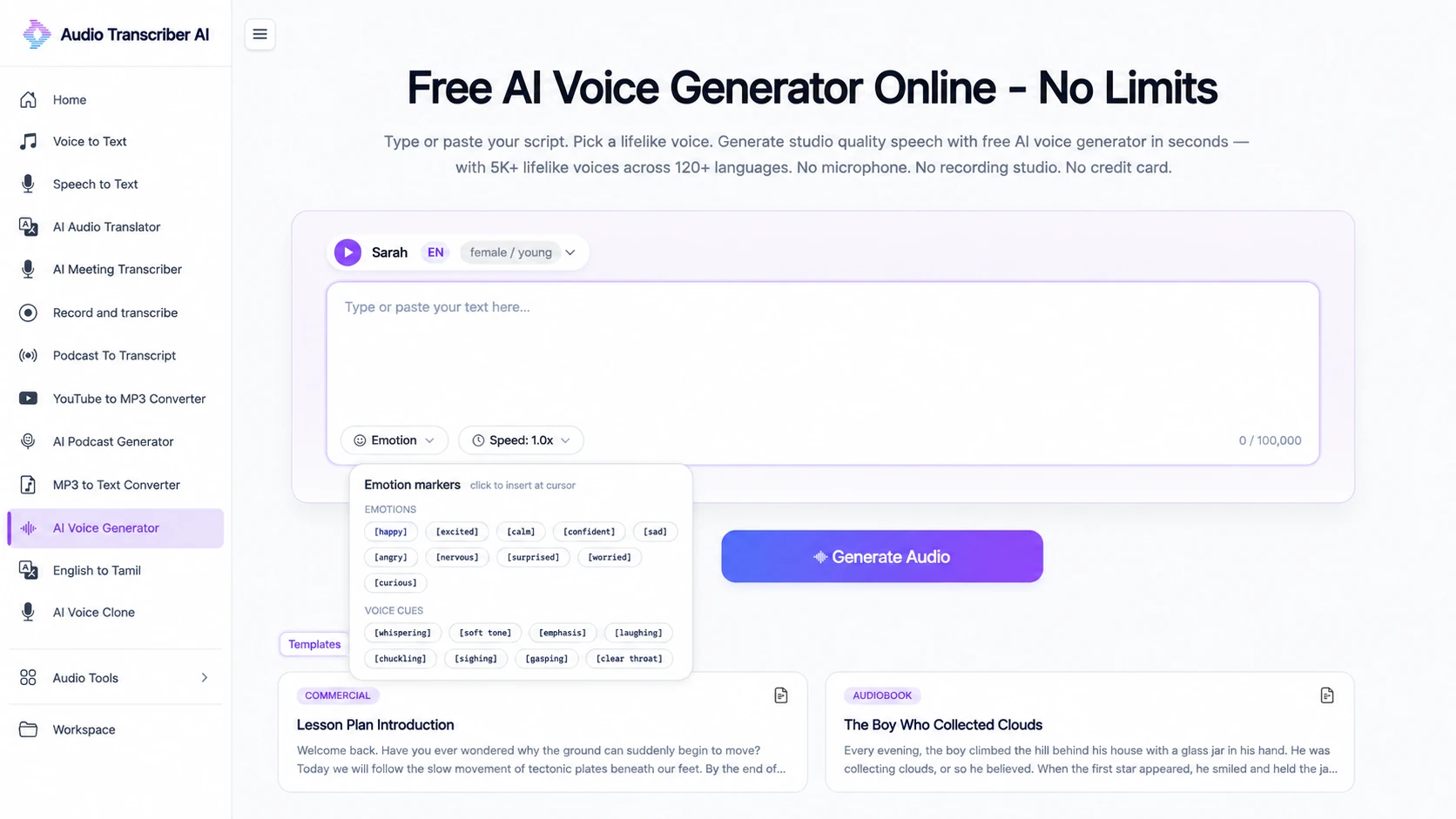
Overall, Audio Transcriber AI is a better option for users looking for free and straightforward AI voice generation, especially for text-to-speech and voice cloning tasks. Akool is better suited for users who need a complete AI content production platform, where voice generation is only one part of the creative process. The right choice depends on whether you prioritize affordability and simplicity or a more advanced all-in-one workflow.
Tips for Choosing the Best AI Voice Generator
Picking the right tool is less about the biggest voice count and more about matching your actual workflow:
- Define your primary use case first. Video production, standalone audio, or multilingual campaigns each favor different tools.
- Test the free tier realistically. Do not trust the headline number, check how many real minutes it gives you (Akool's 1,000 characters is about one minute).
- Weigh voice quantity against voice quality. A large voice library does not guarantee better results. The overall quality, realism, and consistency of available voices are more important.
- Check your language and accent needs. Confirm the specific languages you care about sound good. Always test the specific languages and accents that match your target audience.
- Compare customization options with ease of use. Advanced users may prefer tools with detailed controls for tone, pacing, and delivery, while casual users may value a simpler workflow with quick results.
- Confirm export and usage friction. No-sign-up, one-click audio download beats a video-centered export flow for pure voice work.
- Read the pricing page. Credit-based systems, usage limits, and bundled AI features can make it difficult to estimate the actual cost. Look beyond the subscription price and consider what you are getting for your usage needs.
FAQs About Akool AI Voice Generator
Does Akool have a free AI voice generator?
Yes, but only 1,000 characters/month. That's about 1 minute of audio - enough for testing, not production.
How many voices and languages does Akool support?
900+ voices, 175+ languages and accents (via Azure, ElevenLabs, and Hailuo engines).
Can I use Akool commercially?
Depends on your plan. Pro and Pro Max allow commercial use. Check Akool's current ToS for specific licensing terms.
What's the best free alternative to Akool AI Voice Generator?
For users who mainly need free AI voice generation, Audio Transcriber AI is a good alternative. It offers free AI voice generation and voice cloning features without requiring a paid subscription.
Does Akool support voice cloning?
Yes, but only on paid plans. Free tier does not include voice cloning.
How does Akool's voice quality compare to ElevenLabs?
ElevenLabs is widely known for its highly natural English voices and strong emotional expression. Akool's strength is its flexibility (Azure + ElevenLabs + Hailuo) for multilingual projects.
How long does it take to generate audio on Akool?
Short audio clips are usually processed within seconds, while longer scripts may take more time. Users who need faster processing can purchase Akool's Fast Generation Pack, which accelerates generation for the first 100 results and remains valid for 30 days.
Can I download audio as MP3 from Akool?
Yes, TTS output can be downloaded. The exact format may depend on the engine used.