
CnvMP3 Review: Is It Safe, Fast, and Worth It for YouTube to MP3?
YouTube to MP3 tools should always be used with caution, as some online converters may come with potential security concerns, including unstable performance or unsafe download environments. This is why many users are becoming more careful when choosing which service to trust.
CNVMP3 has gained attention as a simple online tool that allows users to convert YouTube videos to MP3 files quickly, without requiring installation or registration. However, the real question is whether it is actually reliable in practice—how well it performs in terms of conversion speed, audio quality, and overall stability.
What Is CNVMP3 Converter?
CNVMP3 is a browser-based YouTube to MP3 tool that allows users to convert YouTube videos into audio files directly online, without installing any software or creating an account. It works smoothly on both desktop and mobile devices.
According to its official positioning, CNVMP3 focuses on speed, simplicity, and ease of use. The workflow is straightforward: users paste a YouTube link, select the output format, and start the conversion process. In most cases, the file is ready for download shortly after.
While the tool is primarily designed for YouTube, it also supports a limited range of other platforms, including TikTok, Reddit, Instagram Reels, Facebook, Twitch, and X (Twitter). However, YouTube remains its main focus and core use case.
From a product perspective, CNVMP3 is positioned as a lightweight utility tool. It prioritizes quick conversions over advanced functionality such as batch processing or editing, making it more suitable for simple, everyday use.
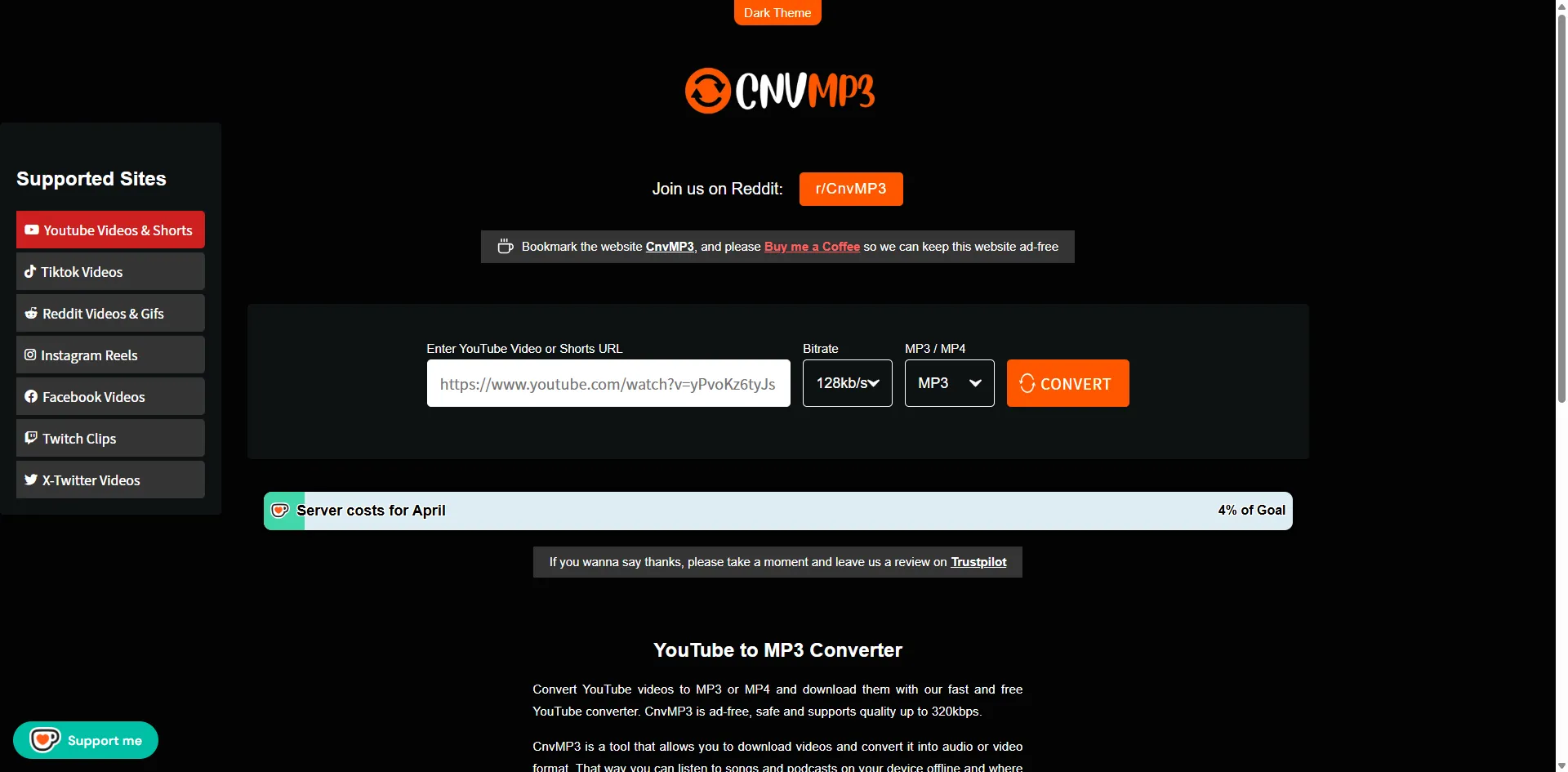
Key features:
| Feature | Description |
|---|---|
| 🎧 Core Function | YouTube-focused MP3 conversion |
| ⚡ Performance | Fast conversion depending on video length |
| ⏱️ Duration Support | Supports videos up to 180 minutes (3 hours) |
| 🌍 Browser Compatibility | Works on Chrome (Windows), Safari (iPhone), and Firefox (Android) |
| 📱 Device Support | Works on mobile and desktop browsers |
| 🎵 Output Quality | MP3: 96 / 128 / 256 / 320 kb/sMP4: 144p / 360p / 480p / 720p / 1080p |
| 💰 Cost | Free to use |
Overall, CNVMP3 is a lightweight YouTube-focused converter for quick, everyday use rather than advanced or bulk downloading.
How to Use CnvMP3 to Convert YouTube to MP3/MP4?
Converting a YouTube video to MP3 or MP4 with CNVMP3 is fairly straightforward. In this guide, we’ll use MP3 as an example to walk through the process step by step. This walkthrough is based on testing of the current v54 version of the tool.
Step 1: Go to YouTube and find the video you want to download. Copy the video URL from your browser’s address bar.

Step 2: Paste the copied YouTube link into CNVMP3’s input box on the homepage. Then select the output format (MP3) and choose your preferred bitrate.
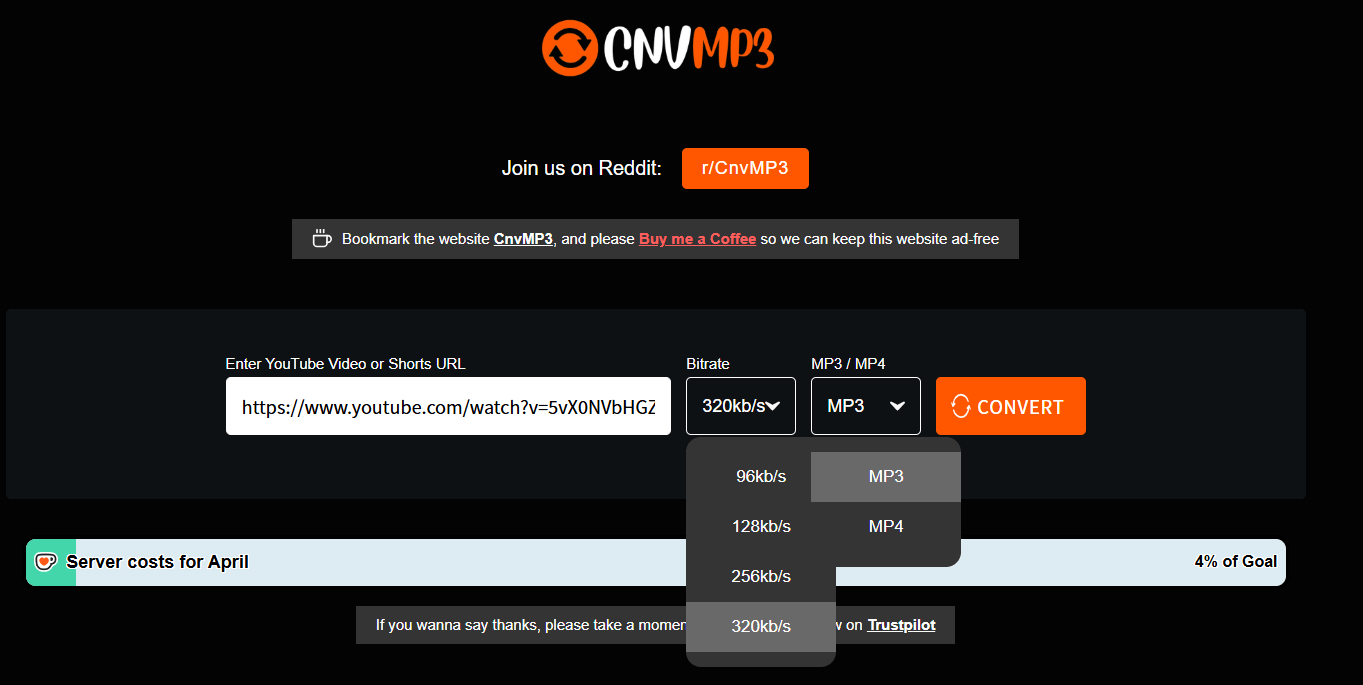
Step 3: Click the “CONVERT” button and wait for the process to finish. In most cases, even a 19-minute video can be converted in just a few seconds, and the download will start automatically once it’s ready.

CnvMP3 Audio Quality Test: Is It Really 320kbps?
How We Tested Audio Quality
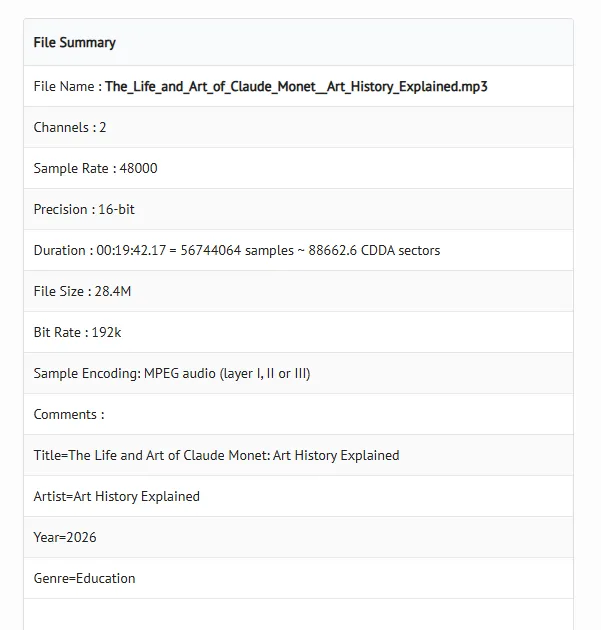
To ensure accurate and objective results, we analyzed the output audio using three tools: MediaInfo, FFmpeg, and Maztr.
- MediaInfo was used to extract key metadata such as bitrate, sample rate, and encoding format.
- FFmpeg helped verify the actual encoding parameters through command-line analysis.
- Maztr provided additional signal-level insights for cross-checking audio quality.
By combining these tools, we validated the results from multiple perspectives and avoided relying on a single data source.
MediaInfo Results
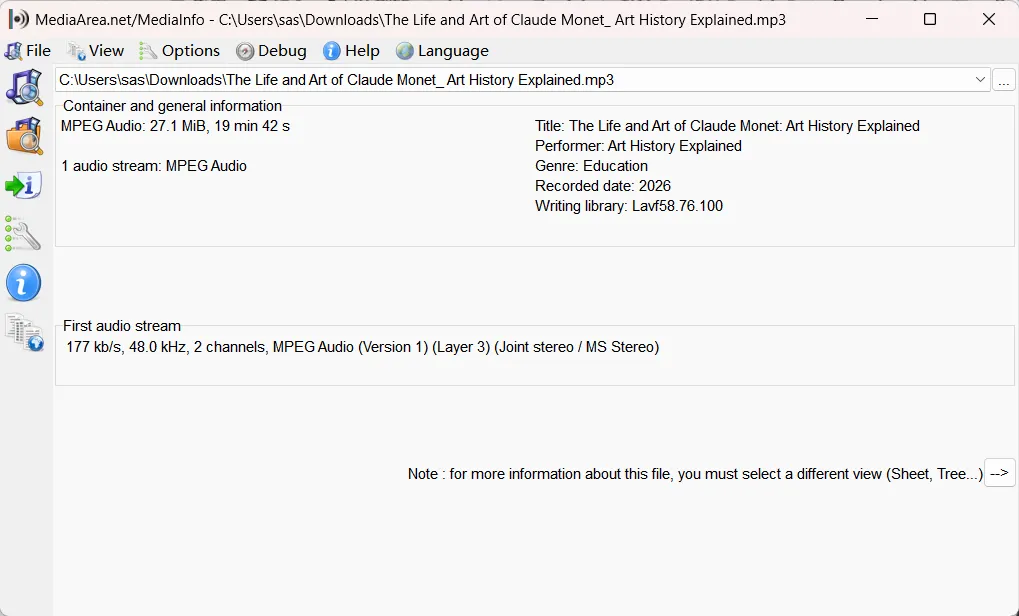
MediaInfo shows that the file is a standard MP3 with a duration of approximately 19 minutes and a size of around 27 MB. It uses a 48 kHz sample rate with stereo channels.
More importantly, the actual audio stream bitrate is around 177 kbps, indicating that the output falls within the mid-quality range rather than true high-bitrate (320 kbps) audio.
FFmpeg Results
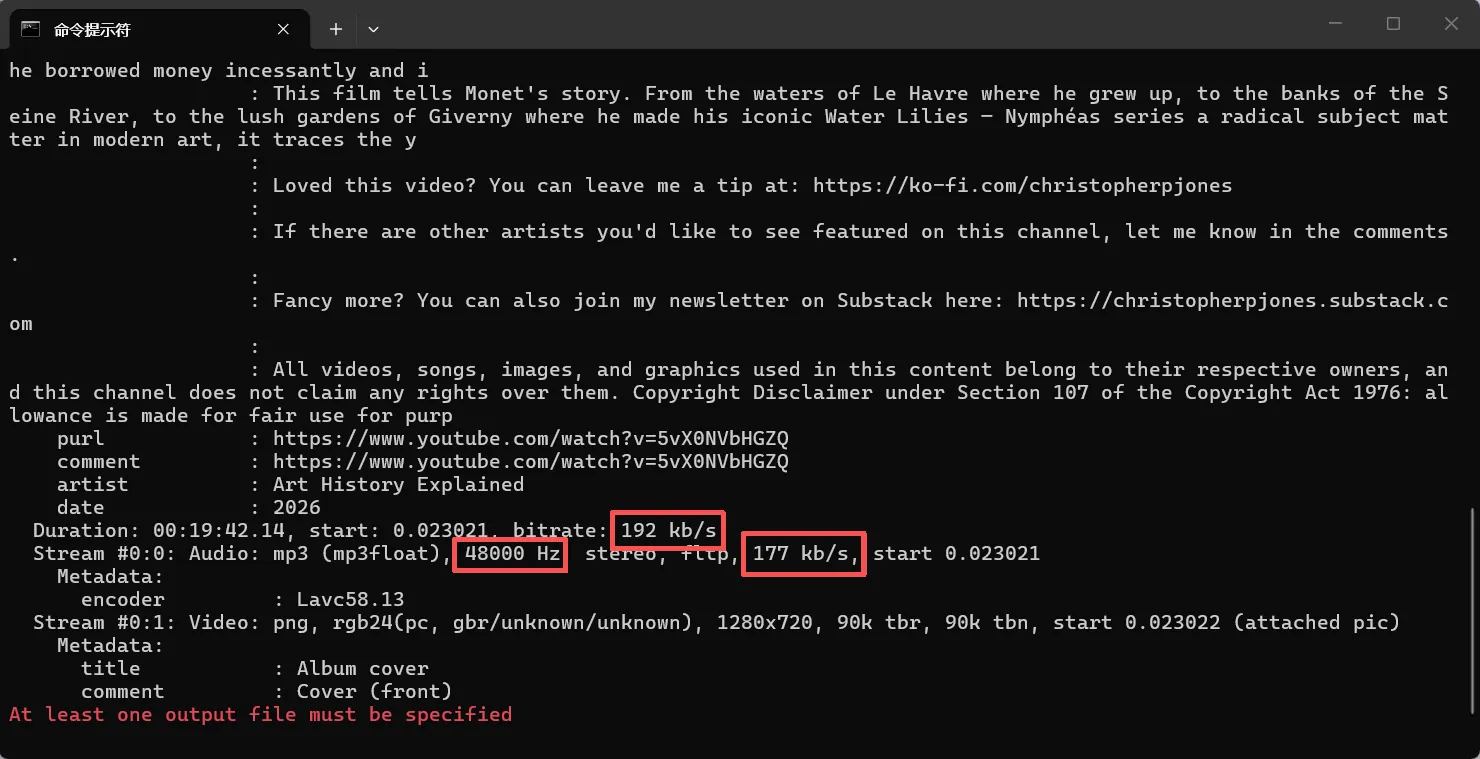
FFmpeg analysis shows that the file is labeled at 192 kbps, with a 48 kHz sample rate and stereo channels, which are standard for MP3 encoding.
However, the actual audio stream is closer to 177 kbps, revealing a gap between the labeled and real bitrate. This suggests compression occurs during conversion, preventing the output from reaching true 320 kbps quality.
Maztr Analysis
Maztr confirms that the file is encoded as MP3 (Layer III, Joint Stereo) with stable waveform characteristics and no structural issues.
It also reports an effective bitrate of around 177 kbps, reinforcing the findings from MediaInfo and FFmpeg that the audio is compressed and falls short of true high-bitrate quality.
Final Audio Quality Verdict
Across all three tools, the output consistently measures around 192 kbps (with an effective bitrate closer to ~177 kbps).
While this is sufficient for everyday listening, it does not match true high-bitrate (320 kbps) audio quality.
CnvMP3: What Real Users Say and How It Performs
“Possibly the best YT to mp3/mp4 website yet! I use it a ton for my editing process whenever I need background music or SFX, and it has never failed me.”
— Reddit user
Based on Trustpilot reviews and recent Reddit discussions, CnvMP3’s real-world performance mainly comes down to two key factors: ease of use and conversion stability (success rate and output consistency).
What real users and community feedback suggest:
- On Trustpilot, many users describe CnvMP3 as a fast, simple, and easy-to-use YouTube to MP3 converter. A recurring theme in reviews is that the tool requires no installation or registration, making it convenient for quick audio extraction. Users also frequently mention that the overall experience feels lightweight and straightforward.
- Reddit users share a similar perspective, often highlighting that the tool is practical for casual use, especially for downloading music or converting videos for offline listening. Some users also describe it as relatively clean compared to other similar converters.
However, feedback across both platforms also points to some limitations:
- Some Trustpilot users report occasional download failures or inconsistent performance, depending on the video source
- Reddit discussions report occasional access instability, temporary downtime, or redirects, and note that while the service works in most regions, it may be restricted or unavailable in certain countries
Overall, CnvMP3 is generally perceived as a lightweight and convenient converter well-suited for everyday, casual use, particularly for quick YouTube-to-MP3 extraction.
That said, real-user feedback also suggests that its reliability is not fully consistent across all scenarios, meaning it is best suited as a simple, on-demand tool rather than a high-stability or production-critical solution.
Pros and Cons of CnvMP3
Based on audio quality testing and real-world user feedback, CnvMP3 shows a clear trade-off between ease of use and output quality consistency.
Multi-tool analysis (MediaInfo, FFmpeg, Maztr) indicates that the actual audio output typically falls around ~177–192 kbps, rather than true 320 kbps, suggesting compression during conversion.
While most users report a smooth and convenient experience, real-world feedback also points to some variability in performance and accessibility.
The key pros and cons are summarized below:
Pros
- Simple, no installation or registration required
- Fast and easy-to-use for quick conversions
- Lightweight and suitable for casual use
- Works in most regions under normal conditions
Cons
- Audio quality does not reach 320 kbps (~177–192 kbps actual)
- Performance can be inconsistent depending on the source video
- May face access issues or restrictions in some regions
- File duration is limited (up to 1 hour for MP4, 1.5 hours for MP3)
Best CNVMP3 Alternatives:Audio Transcriber AI
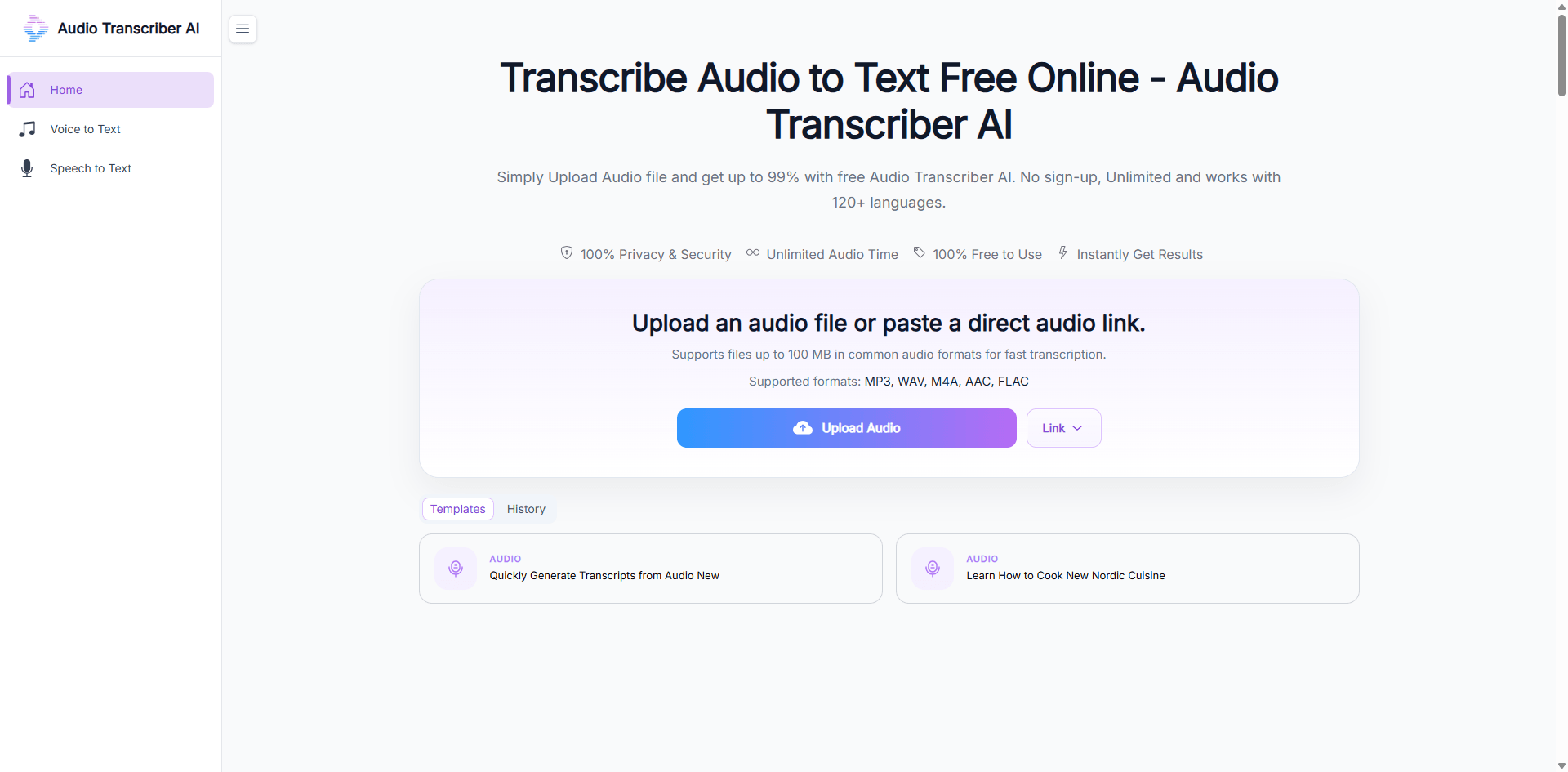
After testing CnvMP3, several limitations become clear, including the lack of batch downloads, missing ID3 tag support, occasional conversion errors, and regional access restrictions. For users who need a more stable and feature-rich solution, Audio Transcriber AI stands out as a stronger alternative.
Why Choose Audio Transcriber AI over CNVMP3?
- More Stable Performance: Reduces failed conversions and improves consistency across different video sources.
- Better Audio Quality Control: Supports up to 320 kbps output with more consistent encoding results.
- Batch & Long Video Support: Handles multiple files and longer videos without requiring repetitive manual actions.
- No Browser Limitations: Not affected by pop-ups, redirects, or regional access restrictions.
- Improved Workflow Experience: Designed for smoother, more efficient, and repeatable conversion workflows.
Comparison Table Between Audio Transcriber AI and CNVMP3
| Feature | Audio Transcriber AI | CNVMP3 |
|---|---|---|
| Audio Quality | Supports up to 320 kbps with stable output | Up to 320 kbps, but quality may vary depending on source |
| Conversion Stability | High consistency, fewer failed conversions | Occasional errors or conversion failures |
| Batch Processing | Supported for multiple files | Not supported |
| Accessibility | No browser limitations | May face regional blocks or access issues |
| Workflow Experience | Structured, efficient, repeatable | Simple but limited for frequent use |
FAQs About CnvMP3
1. Is CnvMP3 safe to use?
Yes, CnvMP3 is generally safe to use through its official website for basic conversions. However, as with most free online tools, users should be mindful of ads, pop-ups, and potential third-party redirects.
2. Is CnvMP3 free to use?
Yes, CnvMP3 is free for basic YouTube to MP3 conversions and does not require any registration or payment.
3. Can I use CnvMP3 on mobile devices?
Yes, CnvMP3 works on both Android and iOS devices through a web browser. That said, the experience may be more stable on desktop, especially for longer or multiple conversions.
4. When should I use Audio Transcriber AI instead of CnvMP3?
If CnvMP3 is unstable or fails to process your video, it’s usually due to server or compatibility issues. For a more reliable video to MP3 or YouTube to MP3 experience, Audio Transcriber AI is a better choice.
5. Are there any limitations when using CnvMP3?
Yes, there are some limitations. MP4 files are generally limited to around 1 hour, and MP3 files to about 1.5 hours. It also does not support batch downloads or playlist conversion, so each video must be processed individually.
Final Verdict
CnvMP3 is a lightweight YouTube to MP3 converter designed for quick, basic use. However, testing and user feedback indicate that actual audio quality is typically around 177–192 kbps (below the advertised 320 kbps), and performance can vary depending on the source, with occasional stability and regional access issues. It works well for casual needs, while users who require more consistent quality, better control, or batch processing may find Audio Transcriber AI a more reliable option.